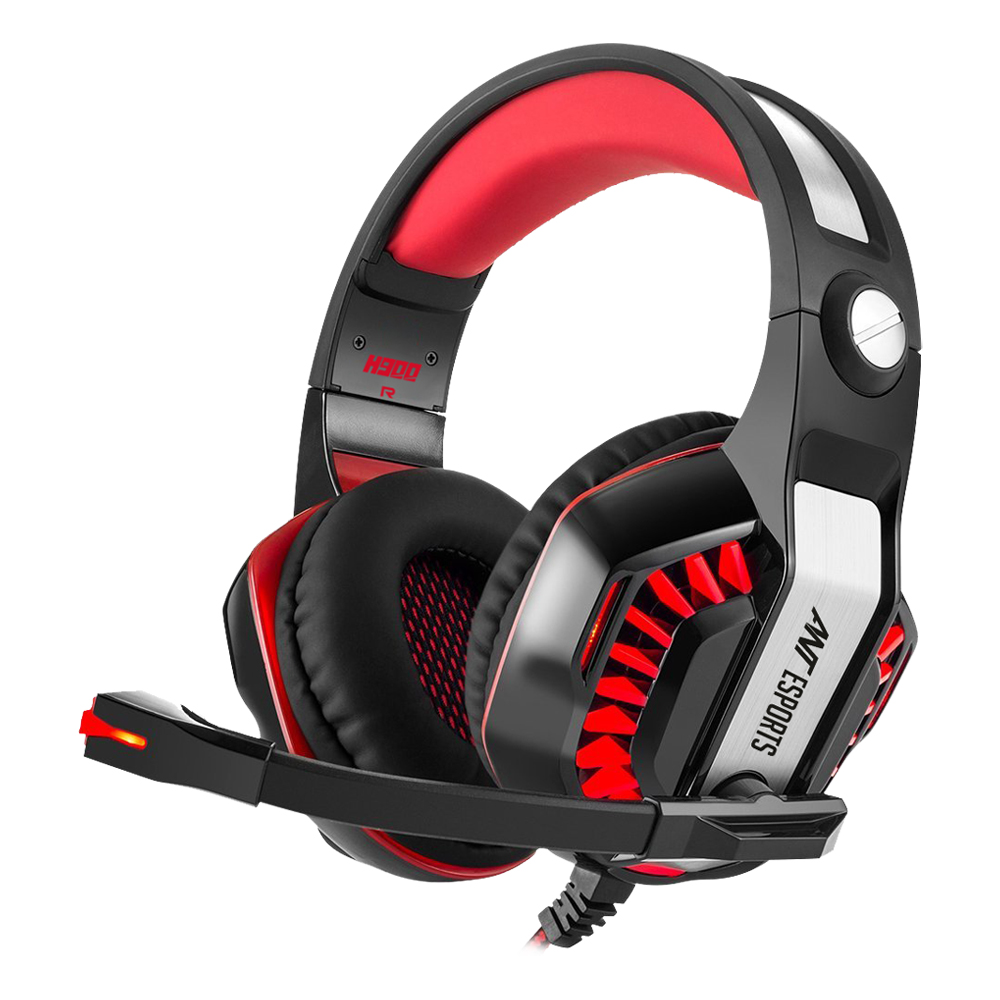


Ant Esports H900 Gaming headset, the professional gaming headset for game enthusiasts.
IMMERSIVE SOUND QUALITY
Ant Esports H900 gaming headset equipped with a premium 50mm neodymium driver that offers immersive sound quality. It hugely augment immersive aural experience, making you feel like in the real battle field.
COMFORTABLE WEARING
Using soft protein ear pads and retractable headband, this xbox one headset gives customers most comfortable wearing experience. And the headset is light weight. You won’t feel any discomfort even after a long gaming sessions.
MULTIPLE PLATFORM COMPATIBILITY
This PC /PS4/ Xbox One headset with a 3.5mm audio jack is compatible with PC, PS4 controller, Xbox One controller(Please note: newer models have a headphone jack, older ones require an adapter.), Nintendo Switch (audio), Nintendo New 3DS LL/3DS (audio), Nintendo 3DS LL/3DS (audio).
NOISE CANCELING MICROPHONE
With the noise cancelling microphone, this gaming headset provides high clarity sound communication for players and filter most ambient noise at the same time. Every voice command would not be missed with this sensitive microphone.
FASCINATING LED LIGHT
When you plug in the USB jack, the fascinating LED light will be on. Red LED light on both sides of Ant Esports H900 gaming headset make it looks cooler and boost the gaming experience.
Notes
- Extra Microsoft adapter (Not Included) is needed when connect with old version Xbox One controller.
- 3.5mm jack splitter cable (Not Included) is needed when you connect with PC having 2 jacks, if you want to use headphone and microphone at the same time.
- The USB interface is only used for power supply to LED light to highlight the atmosphere of the game.
How To Use It On PS4?
- Please test it with your cell-phone before apply the headset on your PS4, to make sure it works well.
- Insert the headset with 3.5mm jack plug into the Gamepad
- Then long press the PS4 button or enter the System Settings, there is a peripheral machines choose “Adjust Sound and Devices”, “Output to the headphones”, then change it to “All audio”. If you have the audio on the “All Audio” setting you can, but if it’s set to “Chat Audio” you can only hear form the side with the mic.
Troubleshooting Methods:
(Sound is too small or no sound)
- Ensure that your audio devices work properly and sound switch has been turned on.
- Turn up the sound volume level, Ensure connecting the plug of headset to audio source correctly.
Package Contents:
- 1 x Ant Esports H900 Stereo Gaming Headset
- 1 x Manual
- ERGONOMIC DESIGN & PREMIUM MATERIAL
- MULTIPLE PLATFORM COMPATIBILITY
- NOISE CANCELING MICROPHONE
- IMMERSIVE SOUND QUALITY
- COMFORTABLE WEARING
- FASCINATING LED LIGHT
| Brands | Ant ESports |
|---|---|
| Speaker size | 50mm |
| Sensivitity | 105+/-3dB |
| Frequency range | 20 Hz-20KHz |
| Microphone | 6.0x 2.7mm |
| Microphone sensitivity | -38+/-3dB |
| Directionality | omni-directional |
| Cable length | 2.1M +/-0.15 |
| LED working voltage | DC 5V +/- 5% |
| Jack plug | USB+3.5mm 4 Pin |
| Operating System | 2000/ME/XP, Windows 10, Windows 7, Windows 8, Windows 8.1 |
Bestsellers

Sale
Sale


Hot




Sale